
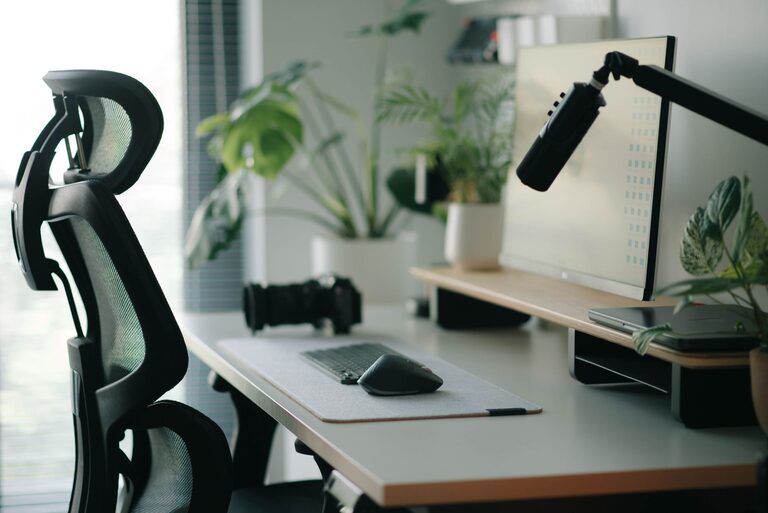
A well-planned desk setup can make work feel easier and more organized. You do not need expensive equipment or a large room to create a comfortable workspace. Small changes to your desk height, lighting, screen position, and daily habits can have a noticeable effect on how your workspace feels.
The goal is to create an environment that helps you stay focused while making it easy to work comfortably. Use the tips below to build a setup that fits your space, tasks, and personal preferences.
Start With the Right Desk Location
The position of your desk affects both focus and comfort. If possible, place it in an area with natural light and limited distractions. A quiet corner can help you concentrate, while a location near a window may make the room feel brighter and more inviting.
Avoid placing your monitor directly in front of a bright window. Reflections can make the screen harder to see. Instead, position the desk so the window is beside you or slightly behind the screen.
Consider these factors when choosing a location:
– Noise from other rooms or nearby streets
– Access to power outlets
– Amount of natural light
– Available space for your chair
– Distance from high-traffic areas
– Room for storage and movement
If you work in a shared space, use a small divider, bookshelf, or plant to create a visual boundary. Even a simple separation can make your work area feel more intentional.
Choose a Desk With Enough Room
Your desk should provide enough space for the tools you use regularly without feeling crowded. A laptop, monitor, keyboard, mouse, notebook, and drink can quickly fill a small surface.
Before choosing a desk, list the items you expect to keep on it. Then allow extra room for writing, reading, or handling documents. A desk that is too small may encourage clutter and make it harder to switch between tasks.
A useful desk surface usually includes:
– Space for your primary screen
– Room for a keyboard and mouse
– An open area for writing
– Storage for frequently used items
– A clear path for cables
If your desk is compact, use vertical storage, monitor stands, or wall shelves to free up surface space. Keep the items you use most often within easy reach and move occasional items farther away.
Set Up Your Monitor at a Comfortable Height
Monitor height and distance can affect how comfortable your workspace feels. Place the screen directly in front of you so you do not need to turn your head repeatedly while working.
The top portion of the screen should be close to eye level. This helps you view the display without constantly looking far up or down. If you use a laptop, consider adding a stand and pairing it with a separate keyboard and mouse.
Keep the monitor about an arm’s length away, then adjust it based on text size and personal comfort. If you find yourself leaning forward to read, increase the text size or move the screen slightly closer.
For a setup with two monitors, place the screen you use most often directly in front of you. Position the second monitor beside it at a similar height and angle. This arrangement can reduce the need to turn your body during frequent tasks.
Improve Your Lighting
Good lighting makes it easier to read and reduces the need to squint at your screen. Natural light is helpful, but it should be balanced with room lighting.
A desk lamp can provide focused light when overhead lighting is too strong or when you work in the evening. Choose a lamp with an adjustable arm so you can direct light toward your notebook or keyboard rather than directly at the screen.
Try these lighting adjustments:
– Reduce glare by changing the screen angle
– Keep bright lights out of your direct line of sight
– Use a lamp for evening tasks
– Choose soft, even room lighting
– Clean the screen regularly to improve visibility
If you use a lamp with adjustable brightness, lower the intensity when the room is dim. The goal is to avoid a sharp contrast between a bright screen and a dark room.
Select a Supportive Chair
A comfortable chair should allow you to sit with your feet supported and your arms relaxed. Look for a chair with adjustable height, a stable base, and enough seat space for your usual posture.
Adjust the chair so your feet rest flat on the floor or on a footrest. Your knees should be positioned comfortably, and your shoulders should not need to lift while using the keyboard.
A chair does not have to be designed specifically for an office to work well. A dining chair can be suitable if it provides stable support and allows you to sit at the right height. Add a cushion or footrest if needed, but avoid accessories that make you feel restricted.
Remember that the best position may change throughout the day. Make small adjustments instead of trying to hold one rigid posture for hours.
Arrange Your Keyboard and Mouse
Keep the keyboard and mouse close enough that you do not need to reach forward. Position them so your elbows can remain near your sides and your shoulders stay relaxed.
If you use a laptop, an external keyboard can make it easier to raise the screen while keeping your hands at a comfortable level. Choose a mouse that fits your hand and works smoothly on your desk surface.
You can also improve comfort by:
– Keeping the keyboard centered with your body
– Placing the mouse at the same height as the keyboard
– Using a desk mat for smoother movement
– Moving frequently used controls within easy reach
– Keeping your wrists in a relaxed position
Test the arrangement by typing for a few minutes. If your shoulders tighten or your arms feel stretched, move the keyboard and mouse closer.
Reduce Clutter and Visual Distractions
Clutter can make it harder to begin a task and easier to lose focus. A clean desk does not need to be completely empty, but every item should have a clear purpose or place.
Use trays, containers, and small organizers for items such as pens, chargers, notes, and cables. Keep only the tools needed for your current work session on the main surface.
At the end of the day, take a few minutes to reset the desk. Put away unused items, return supplies to their storage areas, and prepare anything you will need tomorrow. This simple routine can make the next work session easier to start.
Manage Cables and Devices
Loose cables can make a workspace look messy and may get in the way. Group cables by device and use reusable ties, clips, or cable sleeves to keep them organized.
Label chargers if you use several similar cables. Attach a small cable holder to the rear or edge of the desk to keep frequently used cords accessible.
Keep power strips where you can reach them without crawling under the desk. Leave enough slack for adjustments, but avoid long loops that can tangle or collect dust.
Add Focus-Friendly Tools
A few simple tools can support concentration without making the workspace complicated. A timer can help you divide work into manageable sessions, while a notebook can keep quick thoughts from interrupting your main task.
Useful additions may include:
– A small desk clock
– Headphones for reducing background noise
– A whiteboard for priorities
– A monitor stand with storage
– A plant or simple decorative item
– A water bottle with a secure lid
Use these tools selectively. Too many reminders, screens, or accessories can become distractions themselves.
Build in Regular Breaks
Even a well-designed desk cannot replace regular movement and changes in focus. Step away from the screen periodically, stand up, stretch gently, or look across the room.
You can use natural transition points as reminders, such as the end of a meeting, completion of a task, or time spent waiting for a file to load. Short breaks can also be a good opportunity to tidy the desk and reset your attention.
Review Your Setup Regularly
Your needs may change as your work, equipment, or room changes. Review your setup every few weeks and ask:
– Is anything difficult to reach?
– Do I have enough space for my current tasks?
– Is glare affecting the screen?
– Are cables or clutter becoming a problem?
– Does the chair and desk height feel suitable?
– What causes the most distraction?
Make one or two changes at a time so you can tell what improves the workspace. A comfortable, focused desk setup is usually created through small adjustments rather than one major purchase.
